Solving ACL Element Limits on Cisco FTD
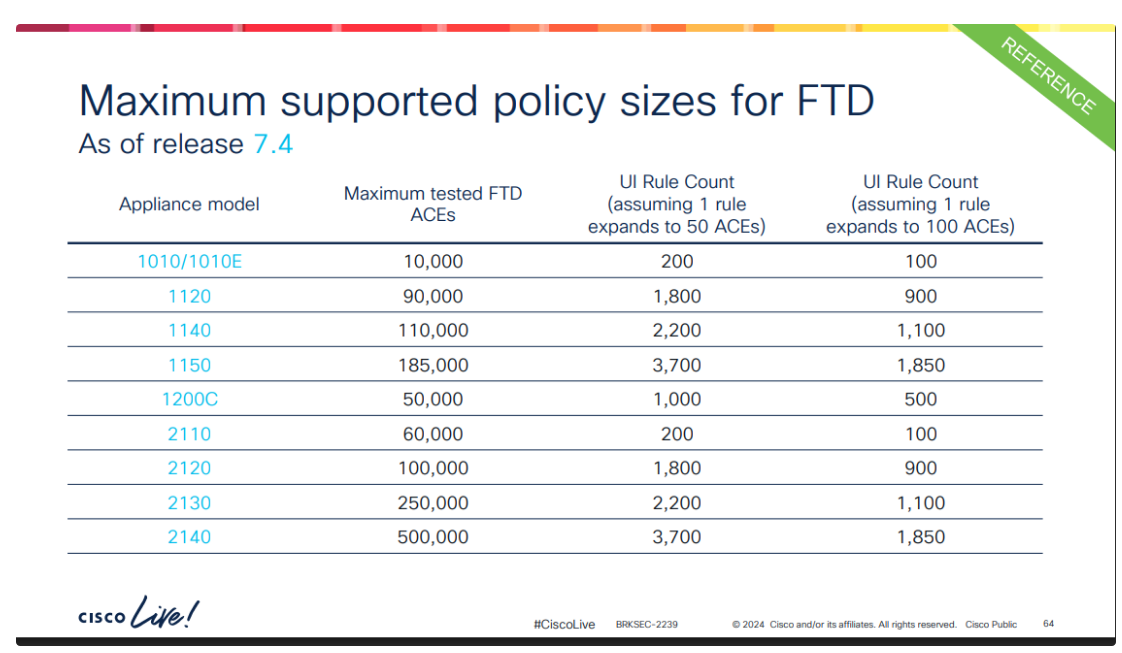
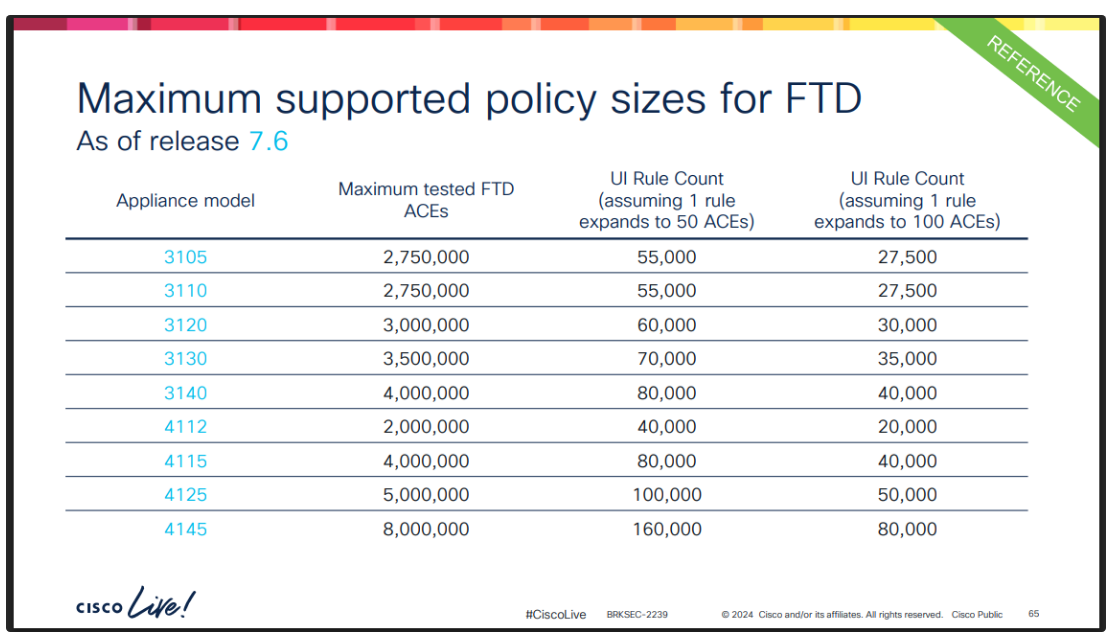
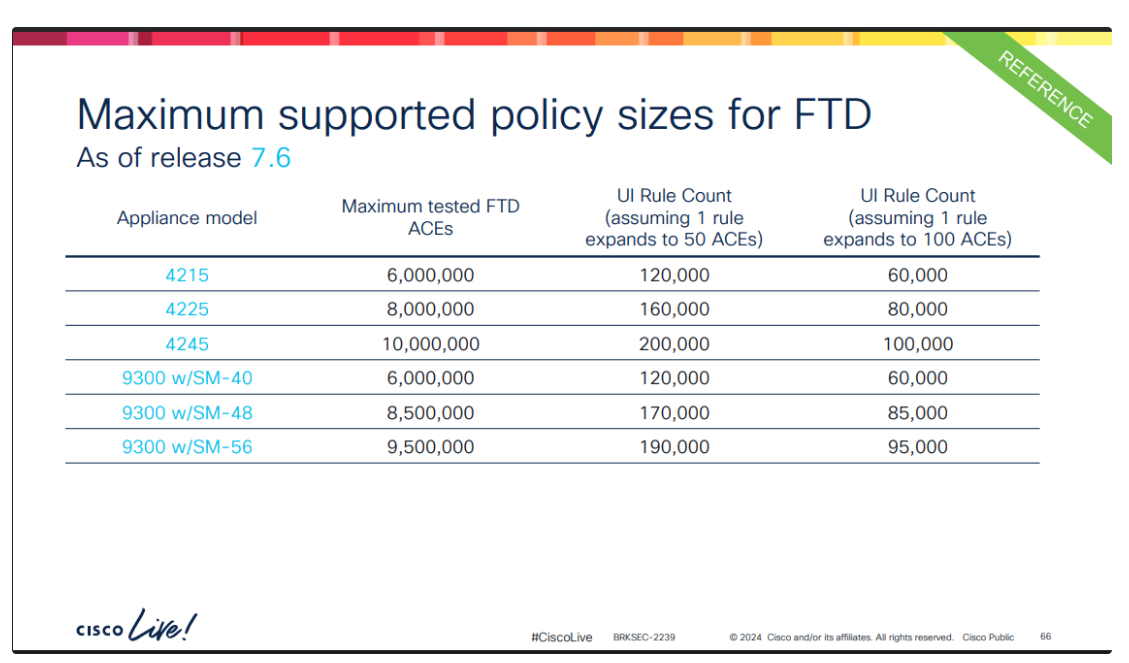
When working with Cisco FTD devices, many limitations — such as maximum throughput and concurrent sessions — are well documented and available directly on Cisco's website. Others, however, only surface through less direct channels like Cisco Live sessions. One example is the maximum Access Control Entry (ACE) count. This limitation is real, and it varies from platform to platform. You can find the complete list published during Cisco Live in 2024 at the end of this article.
ACE Expansion
The reason this limit matters comes down to how FTD handles your rules under the hood. A single, clean-looking access control rule in FMC does not stay a single rule on the device. While operating, the FTD expands each access control rule into multiple access list entries based on the contents of the network and interface objects it references. A rule that uses object groups containing many individual hosts, subnets, and ports can explode into thousands of ACEs in the LINA engine — even though it appears as one line in FMC.
This expansion is expensive. It drives up memory consumption and lengthens deployment time. Push a policy far enough and FMC will warn you that the number of access list elements generated for the policy exceeds the limit for your platform. Once you hit that ceiling, you can no longer deploy — so the limit is a hard operational constraint, not just a performance note.
The expansion is multiplicative, which is what makes it dangerous. Consider a single rule with a source object containing 8 hosts and a destination object containing 8 hosts. Without OGS, the device expands every source-to-destination pairing individually — 8 × 8 = 64 access list elements from that one rule. Scale that up to objects with dozens or hundreds of hosts across many rules, and it becomes clear how quickly a tidy policy in FMC can balloon into hundreds of thousands of ACEs on the device.
The Solution: Object Group Search
Object Group Search (OGS) directly addresses this problem. Its main goal is to reduce the memory required to search access control rules by keeping object groups intact instead of expanding them into individual ACEs. Rather than pre-expanding every combination of source and destination into the access list, the device matches connections against the network objects at evaluation time. This dramatically shrinks the number of access list elements the policy generates, letting you stay under the platform limit while keeping the same effective policy.
Returning to the earlier example: the rule with 8 source hosts and 8 destination hosts no longer generates 64 elements. With OGS enabled, the device does not expand the objects at all — it deploys a single access-list entry and matches connections against the group definitions at evaluation time. That one rule drops from 64 elements to 1 — a 98% reduction from a single rule. Applied across a large policy, this is the difference between comfortably fitting under the platform ceiling and being blocked from deploying.
If your device is approaching its maximum ACE threshold, enabling OGS is the recommended fix.
Is It Already On?
Starting with version 7.2, OGS is enabled by default on new deployments. Unless you've manually disabled it — or you're running a pre-7.2 release, or upgraded from one where OGS was previously off — you'll want to verify it's turned on.
Trade-offs and Precautions
OGS is not entirely free. Because matching now happens against object groups at connection time, it does require additional CPU resources. More importantly, the deployment that enables OGS triggers an ACL recompile, which can be disruptive to system operation. For this reason, make the change during a scheduled maintenance window.
How to Enable OGS
In FMC, navigate to:
Devices → Device Management → select desired firewall → Device tab → Advanced Settings → Edit → check Object Group Search
Deploy the change, and the device will recompile its ACLs using the leaner, object-group-based representation.
How to Check:
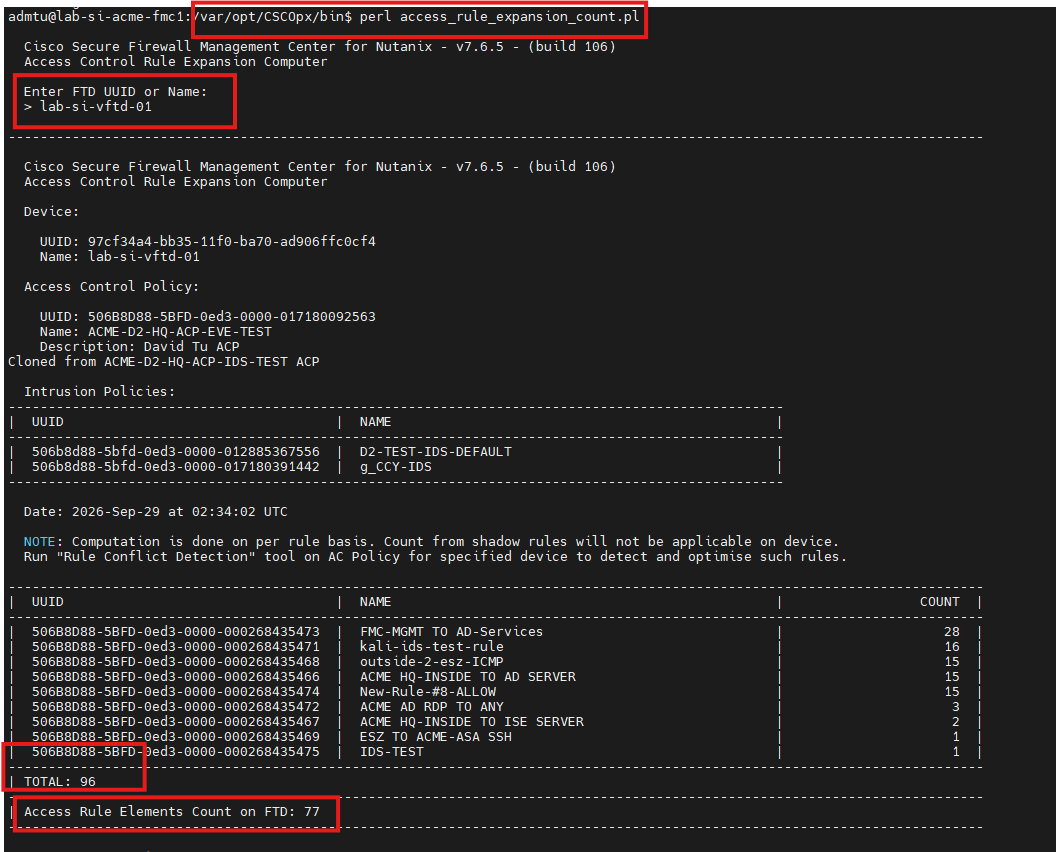
You can check this by logging on to FMC and running the provided Perl script directly from the system. You'll need to SSH to FMC and navigate to /var/opt/CSCOpx/bin and when prompted, enter your device name:
Max ACE Per Model: