Most web traffic today travels over TLS. This is desirable for confidentiality, but it introduces a problem for network security: a firewall's intrusion, file, and URL inspection engines cannot examine what they cannot read. To an inspection engine, malware concealed inside an HTTPS session is indistinguishable from a legitimate banking transaction. SSL decryption addresses this by allowing the firewall to decrypt the traffic, inspect the plaintext, and re-encrypt it before forwarding it onward.
This article describes how the Decrypt-Resign method operates within Cisco Secure Firewall Management Center (FMC), outlines the configuration, and then demonstrates a method for verifying that decryption is genuinely taking place using the trace tool.
Lab Topology and the TLS Key Exchange
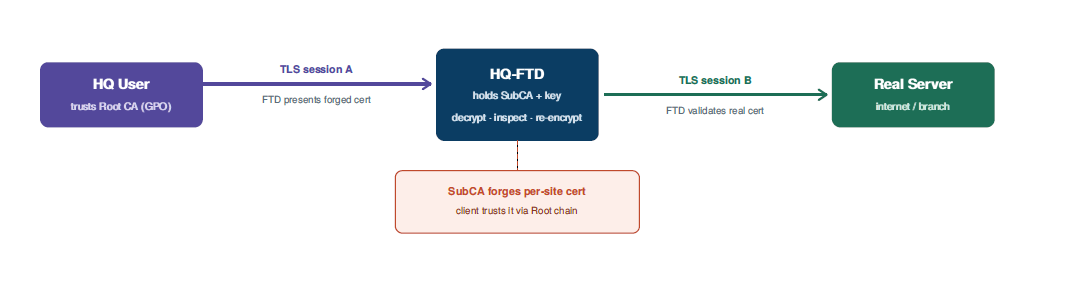
The traffic under examination is an HQ user, acting as the client, reaching an HTTPS server across the firewall.
The lab uses a two-site topology. HQ user (client) → Branch server (HTTPS). The FTD runs two separate TLS sessions and forges the server's certificate toward the
client. Session A (client ⇄ FTD) uses the spoofed cert; session B (FTD ⇄ server) uses the real cert. Cleartext exists only inside the FTD, where inspection happens. The "Real Server" box must be serving HTTPS for this path to exist.
A brief review of how a TLS session establishes its encryption is warranted, as it explains why the firewall must participate in the handshake rather than observe it. The client and server do not transmit the session key across the network. Instead, each contributes half of the key material: the client sends its public key share, the server sends its own, and each side then combines both shares with a locally held private secret to arrive independently at an identical shared key. Because the key is derived rather than transmitted, an observer who records the entire exchange cannot reconstruct it. This mechanism is DiffieHellman key agreement.
Note: If you want to do a quick refresh on the complete HTTPS communication with TLS, I have a blog here that explains this.
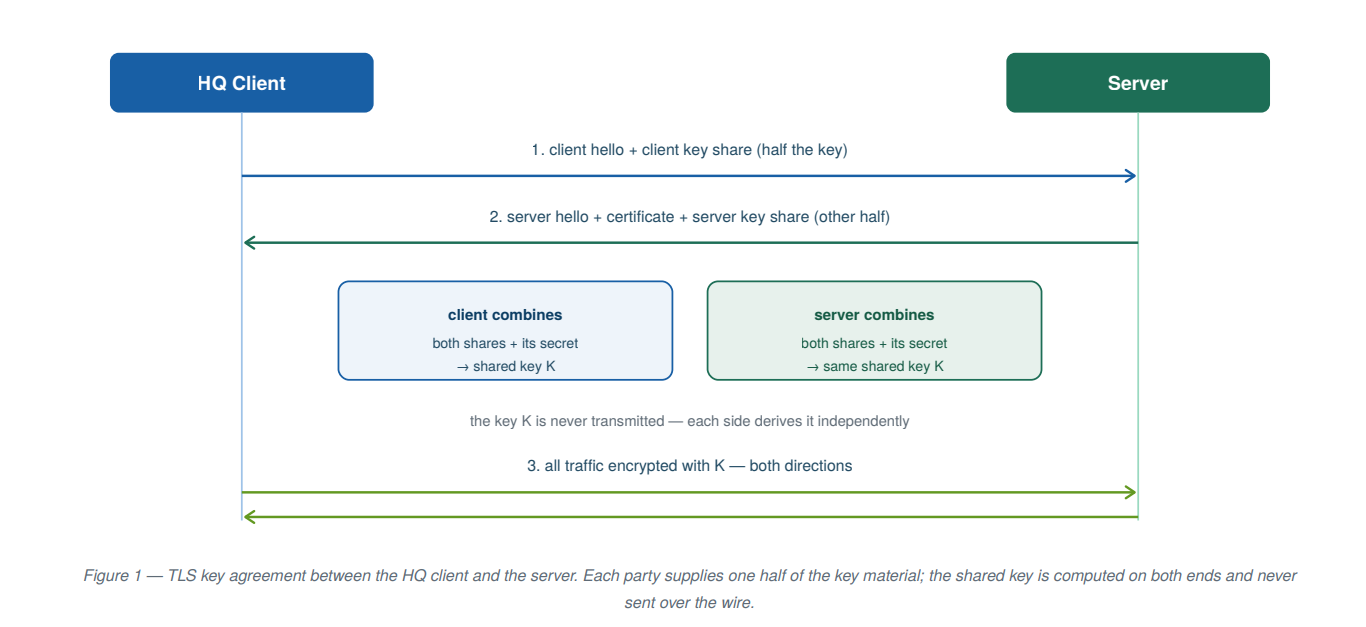
The consequence for decryption is direct. Because the session key is derived from material contributed by both parties during the handshake, the firewall cannot recover it by passive observation. It must act as a participant in the key exchange with each side, which is precisely what the two-session model accomplishes: the FTD negotiates one key with the client and a separate key with the server, and therefore holds the keys to both legs.
Configuration in FMC
The configuration proceeds in four stages:
- Create the resigning CA. Generate a certificate signing request from FMC (Objects → PKI → Internal CAs), have the Microsoft CA sign it as a subordinate CA, and import the resulting chain back into FMC. This provides the FTD with a CA certificate and private key suitable for signing generated certificates.
This step requires a bit more explanation. The Cisco FTD can’t use a public root CA such as VeriSign to forge the destination server’s certificate — it doesn’t hold VeriSign’s private key, and only that key can sign a cert that chains to VeriSign. So instead, the FTD acts as its own subordinate CA: using its SubCA private key, it generates and signs a forged certificate for the destination on the fly. This is what “resign” means. And because the client trusts the root we distributed, this works for both internal and public websites — the destination’s real certificate authority never enters into it. - Distribute the root CA to clients. Install the root into each client's trusted-root store, by Group Policy for domain members or manually otherwise. This step is what allows the generated certificates to validate silently, fulfilling the same role that a public authority such as DigiCert plays for genuine public sites.
- Build the Decryption policy. Create a rule with the Decrypt-Resign action, select the internal CA, and scope the rule by source zones (the user zones) and destination zone (outside).
- Associate and deploy. Attach the Decryption policy to the Access Control policy, assign it to the HQ FTD, and deploy. Once the deployment completes, the firewall will intercept and resign sessions that match the rule.
Once the deployment completes, the firewall will intercept and resign sessions that match the rule..
Verifying with Trace Tool
Before verifying with the trace tool, you want to make sure your SSL policy is setup correctly and both, the puclic and private certs are selected in the configuraiton.
From the subject FTD, open up CLISH mode and run the following command: show ssl-policy-config

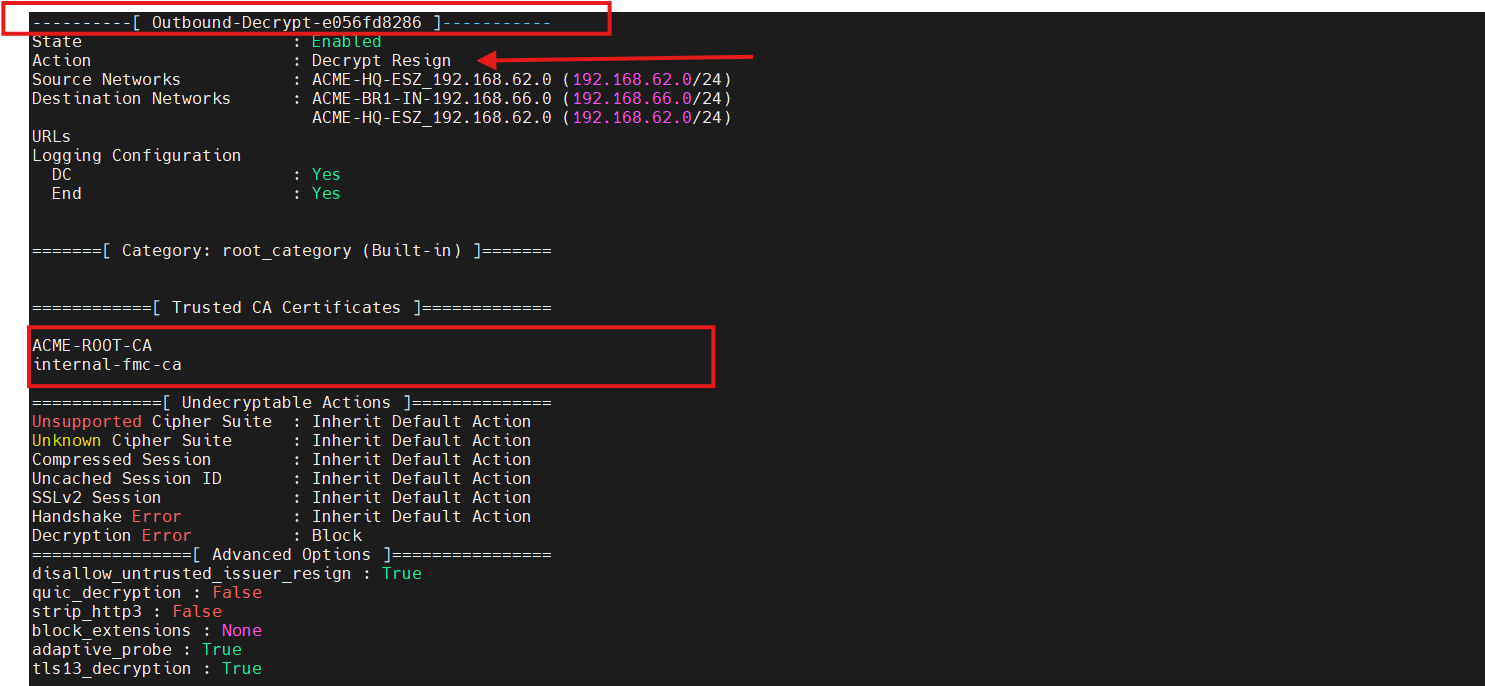
the output will show you the name of the decryption policy, the default action, the rules in the policy and the puplic CA certs that were selected. Once this is confirmed, you can move onto to the system support trace tool.
Note: The tool require live traffic simulation.

The tool prompts for the flow of interest - source and destination address and port. Once the trace is active, generate some traffic from the client, the tool then prints a packet-by-packet account: the rule that matched, the verdict rendered, and, of particular relevance here, whether and when decryption occurred.
Reading the Trace
The following excerpt is taken from the lab. The client is 192.168.62.10, the server is 192.168.66.66, and the session is on port 443. Line numbers have been added for reference.
The TCP handshake
The session opens with the standard TCP three-way handshake. The firewall identifies the matching rule immediately:

The TCP flags identify each stage of the handshake. On line 1, ******S* is the SYN that opens the connection; on line 4, ***A**S* is the server's SYNACK; and on line 5, ***A**** is the client's closing ACK. Line 6 confirms the connection is established. Two observations are already available: the flow has matched the intended rule, SSL-RESIGN-DECRYPT (line 3), and the firewall has registered the session rather than passing it unexamined.
TLS identification
As the TLS handshake begins, the firewall classifies the application and signals its intent to decrypt:

The firewall has identified the traffic as HTTPS (line 8) and has extracted the TLS host name (line 9), which demonstrates that it is reading into the TLS layer. The notation wait for decryption event on line 7 indicates that the firewall intends to decrypt the session rather than forward it unexamined.
The Verdict

A verdict of block on line 11 does not indicate that the traffic has been dropped. It must be read together with the reason on line 12: sfssl, allow . The sfssl component is the SSL decryption engine. The firewall blocks the original encrypted packet so that it may substitute a processed one — decrypting it, inspecting the plaintext, re-encrypting it, and injecting the replacement. The allow in the reason confirms that the session itself is permitted. In a decryption flow, therefore, a verdict of block accompanied by the reason sfssl, allow is the expected and correct result; it is the signature of the decryption engine substituting the processed packet, not evidence of a dropped connection
Confirmation of Decryption

Three elements confirm the result. Line 13 is the firewall's explicit statement that it is decrypting the session. Line 14 shows that the firewall decrypted the client's data, processed it, and injected the re-encrypted payload toward the server. Line 15 shows the same operation performed on the server's response as it returns to the client. The presence of injection in both the forward and reverse directions is characteristic of the two-session resign model: the firewall is positioned between both legs of the connection, decrypting and re-encrypting each. Were this a simple pass-through, neither the decrypting event nor the xTLS injections would appear.
Significance
The value of decryption lies in what becomes possible once the payload exists as plaintext within the firewall: the intrusion and file policies are able to inspect it. Traffic that would otherwise be concealed — malware delivered over HTTPS, data exfiltration, prohibited file transfers — becomes visible to inspection. Pairing the Decryption policy with an intrusion or file policy causes the decrypted traffic to generate events, which is the objective of the configuration.
Takeaway:
- Decrypt-Resign operates by terminating two TLS sessions and bridging them; the client trusts the generated certificate because the CA root has been distributed to it. The CA certificate can be created two ways: self-signed directly on FMC, or by generating a CSR on FMC and having your organization’s CA sign it as a subordinate CA. Either way it must be a genuine CA certificate - one carrying CA:TRUE and keyCertSign - because those extensions are what authorize it to issue certificates. If you go the organizational route, request it from the Subordinate Certification Authority template, which is the template that sets them. The FTD can then forge and sign certificates on the fly because it holds both that signing authority and the certificate’s private key.
- TLS session keys are derived from key material contributed by both parties and are never transmitted, which is why the firewall must participate in the handshake in order to decrypt.
- The trace tool, invoked with system support trace , is the most direct means of verifying decryption.
- In the trace, a verdict of block with the reason sfssl, allow is normal; it reflects the decryption engine substituting the processed packet.
- The definitive evidence is the decrypting event together with xTLS direct injection in both the forward and reverse directions.
- Alternatively, you can also use system support tls-inspection-debug command at clish if you want to see the detail of the decryption rule, but it will not show you the tcp handshake, which can be useful to validate L4 rules that might deny the traffic or other communication issues.