What is TLS?
TLS is the more secure successor to SSL. Most people still say “SSL” when they mean TLS, but it’s actually the other way around — SSL is the old name, and TLS is what we use today. Nearly all HTTPS traffic now runs on TLS, and the latest version is TLS 1.3.
But what exactly is SSL or TLS? In short, it provides two things for web traffic: authentication (confirming the website is really who it claims to be) and encryption (scrambling the data so only the two sides can read it). Without it, anyone positioned between you and the website could quietly capture your traffic and read everything in plain text — passwords, messages, and all.
How does TLS work?
To help explain how TLS work, lets use the diagram below to show the complete HTTPS communication:
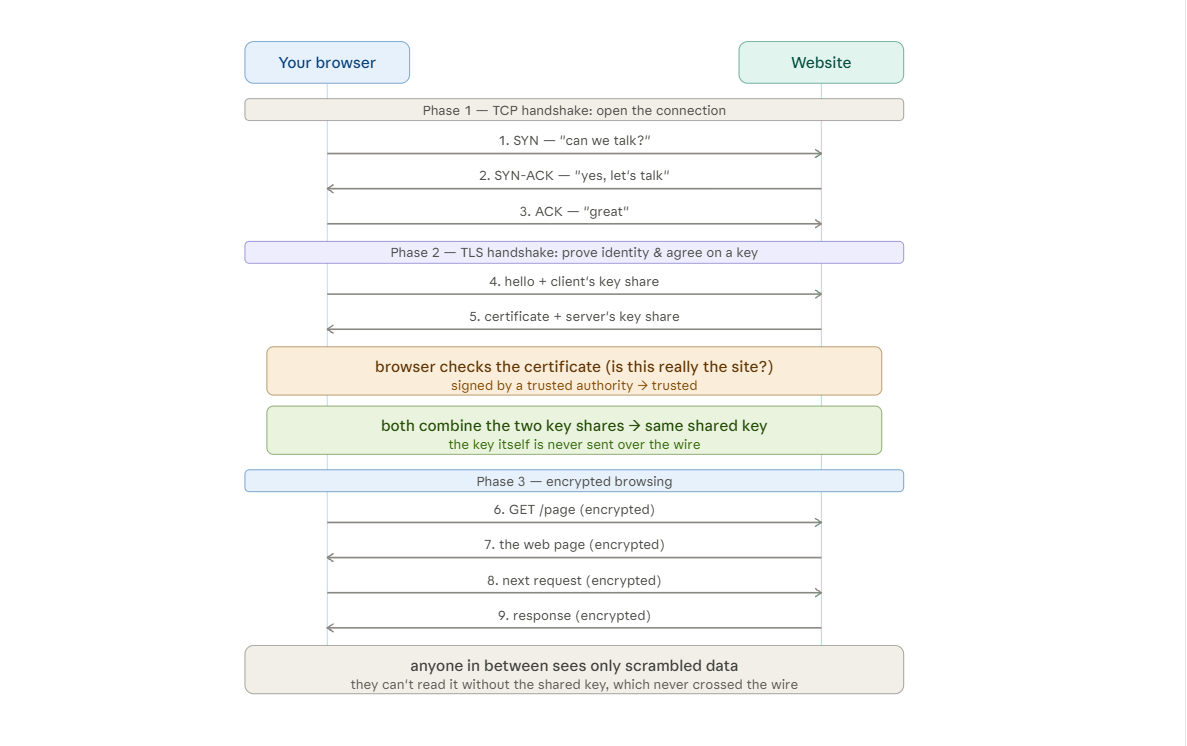
Phase 1 — TCP handshake (3-way handshake)
1. SYN — browser: “can we talk?”
2. SYN-ACK — website: “yes, let’s talk”
3. ACK — browser: “great”
Phase 2 — TLS handshake (prove identity & agree on a key). This is the hardest part to grasp for most folks.
4. hello + client’s key share - when the client sends the hello packet, it also sends the first half of the key share, along with a set of ciphers that the server can choose from.
5. certificate + server’s key share - the server receives the client's hello, choose a cipher it supports and sends back its certificate (identity public key + CA signature) and the 2nd half of key share.
Then the two in-between steps. First, the browser checks the certificate against the list of root Certificate Authorities (CAs) preinstalled on it - most public websites are signed by a handful of these CAs. The CA’s job is to vouch for the identity of the server’s certificate, since the CA is the one that issued it. Second, both sides combine the two halves into the same secret key - which is never sent over the wire..
Phase 3 — With the cipher and keys exchanged, the traffic can now be encrypted and decrypted by both sides. From here on, every request and response travels scrambled — anyone in between sees only noise.